
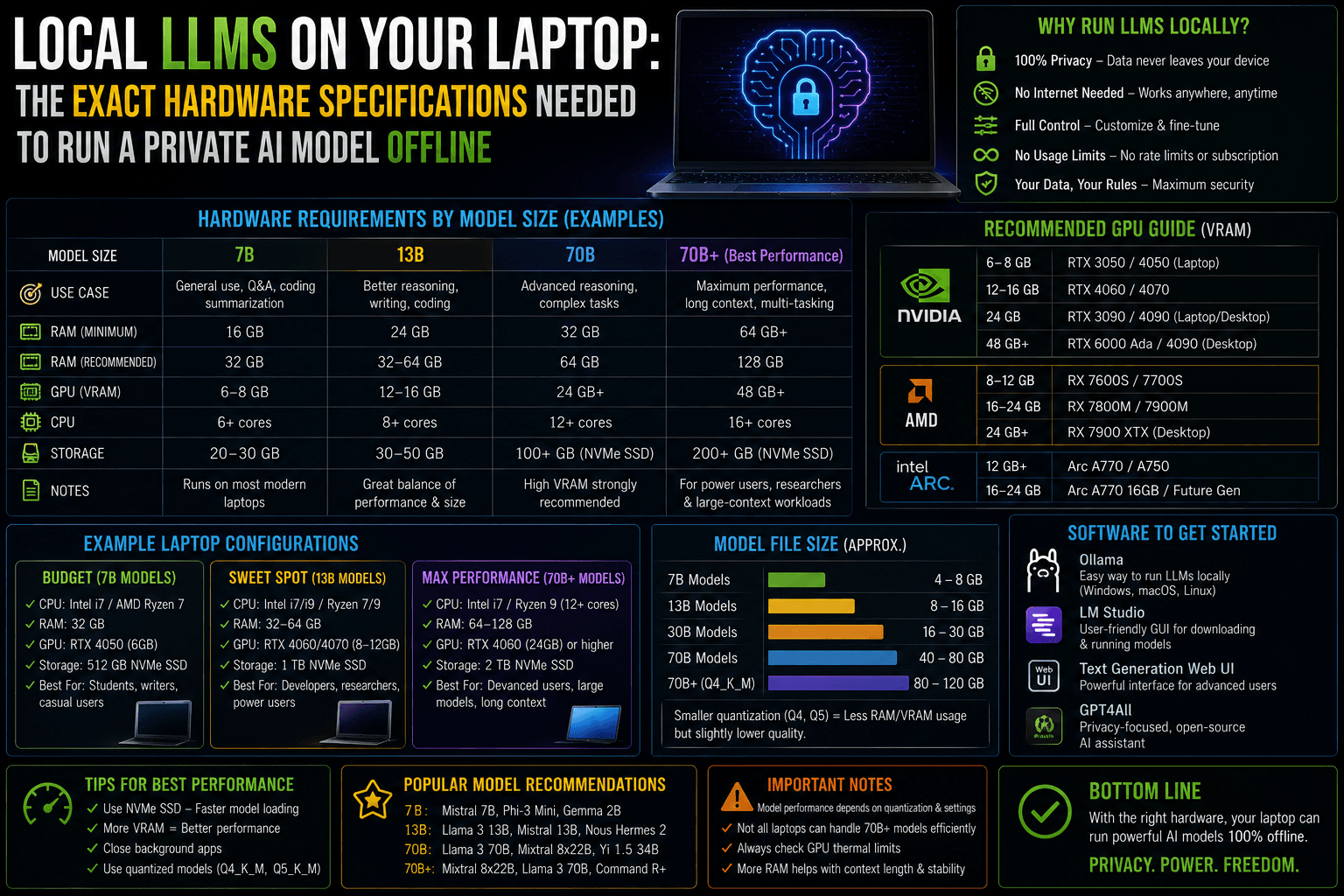
Running a Large Language Model (LLM) completely offline on your laptop is no longer a futuristic novelty—it is a highly viable workflow for privacy, coding assistance, and cost savings.
However, local AI turns traditional PC hardware requirements on their head. You don’t need a cutting-edge processor to get started; instead, local inference lives and dies by Memory Bandwidth and VRAM (Video RAM).
To run a private model without experiencing painful “swapping” (where your system stalls as it forces data onto your hard drive at 1 word per second), your laptop must meet specific hardware thresholds.
1. Understanding the Golden Rule: Quantization & Memory
Before buying or upgrading hardware, you must understand how an LLM fits into a laptop. A raw, uncompressed model requires massive enterprise hardware. To run them locally, developers use quantization—a mathematical process that compresses the model’s weights from 16-bit float values (FP16) down to 4-bit (Q4) or 8-bit (Q8) integers.
A 4-bit quantization reduces the model size by roughly 70% with negligible losses in reasoning capability.
The VRAM Formula: To calculate how much graphics memory a model needs, use this basic formula:
$$\text{Model Parameters (in Billions)} \times 0.6 = \text{Required VRAM/RAM in GB}$$
Add an extra 1 to 2 GB to this total to account for your laptop’s operating system and the context window (KV cache).
2. The Tiered Hardware Specification Matrix
Laptop hardware setups fall into three distinct performance tiers based on the size of the model you want to deploy.
Tier 1: The Entry Level (3B to 4B Parameter Models)
- Target Models: Llama 3.2 (3B), Phi-4 Mini, Gemma 3 (4B).
- Capabilities: Basic text generation, summarization, and simple script writing.
| Component | Minimum Specification | Recommended Specification |
| Graphics (GPU) | Integrated Graphics (Intel Iris Xe / AMD Radeon) | NVIDIA GTX 1660 / RTX 3050 (4GB) |
| System RAM | 8 GB DDR4 / DDR5 | 16 GB DDR5 |
| Storage | 15 GB free space on a standard SSD | 20 GB free space on an NVMe M.2 SSD |
Tier 2: The Sweet Spot (7B to 14B Parameter Models)
- Target Models: Qwen3 (8B), Gemma 3 (12B), Mistral Small 3, Phi-4 (14B).
- Capabilities: Advanced programming assistance, complex reasoning, nuance-heavy roleplay.
| Component | Minimum Specification | Recommended Specification |
| Graphics (GPU) | NVIDIA RTX 3060 / 4050 (6GB VRAM) | NVIDIA RTX 4060 / 4070 (8GB VRAM) |
| System RAM | 16 GB DDR5 | 32 GB DDR5 (Crucial for 12B+ models) |
| Storage | 30 GB free space on an NVMe SSD | 50 GB free space on a PCIe Gen 4 NVMe SSD |
Tier 3: The Flagship Station (17B to 32B Parameter Models)
- Target Models: Llama 4 Scout (17B Mixture-of-Experts), Qwen 3.5 (27B), Command R+.
- Capabilities: Full project-wide code generation, autonomous local agents, and complex logic puzzle analysis.
| Component | Minimum Specification | Recommended Specification |
| Windows Options | RTX 4080 / 4090 Laptop GPU (12GB – 16GB VRAM) | Dual Desktop Workstation GPUs (Out of Laptop Scope) |
| The Unified Exception | Apple Silicon M3/M4/M5 Pro (36GB Unified Memory) | Apple Silicon M5 Max (64GB – 96GB Unified Memory) |
| Storage | 100 GB free space on a high-speed SSD | Dedicated 1TB PCIe Gen 4 NVMe SSD |
3. Windows vs. Apple Silicon: The Architecture Divide
When configuring a machine for local AI work, Windows and macOS handle memory routing in entirely different ways.
The Windows Framework (NVIDIA CUDA is King)
On a Windows laptop, your local model must fit completely inside your graphics card’s dedicated VRAM. If a quantized 12B model takes up 9 GB of space, and your laptop only has an 8GB RTX 4060, the inference engine (like Ollama or LM Studio) will offload the remaining 1 GB to your slower system RAM. This causes a major speed bottleneck.
- The Upgrade Strategy: System RAM on Windows is cheap and often user-upgradable. Moving from 16GB to 32GB of DDR5 system RAM protects your OS from crashing when models max out your system memory.
The Mac Framework (The Unified Memory Advantage)
Apple Silicon chips (M-series Pro, Max, and Ultra) use a Unified Memory Architecture (UMA). This means the CPU and the GPU share the same pool of hyper-fast RAM.
- The AI Advantage: If you buy a MacBook Pro with 64GB of unified memory, you can allocate up to 45GB+ of that memory directly to act as VRAM. This allows a premium Apple laptop to run massive 32B or even quantized 70B models that would physically crash a high-end Windows gaming laptop.
4. Setting Up Your First Model (Under 10 Minutes)
If your machine meets the Tier 1 or Tier 2 specifications above, you can test a completely private, offline model using a lightweight local engine:
1. Download an Inference Engine: Requires ~200MB.
Download and install Ollama (via command-line) or LM Studio (a complete visual graphical user interface) for your operating system.
2. Fetch an Entry-Tier Model: Requires ~5GB free storage.
Open your terminal or command prompt and run the pull command to fetch a balanced 8B model. For example: ollama pull qwen3:8b or ollama pull llama3:8b.
3. Disconnect from the Internet: Optional verification.
Turn off your laptop’s Wi-Fi. This proves the system is running locally and your data is not leaving the device.
4. Initiate the Chat Pipeline: Instant Execution.
Run ollama run qwen3:8b to begin querying your private, local assistant with zero latency or external network requests.
Thermal Warning: Running local LLMs forces your laptop’s silicon to operate at 100% capacity during text generation. Ensure your laptop is raised on a hard surface or cooling pad to avoid aggressive thermal throttling, which slows token generation speeds regardless of how much RAM you have.