Why Standard Passwords Are Passé
The foundation of personal and professional digital security has been the alphanumeric password. We’ve been told to mix uppercase letters, numbers, and special symbols, and to change them frequently.
However, this reliance on memory has created a massive structural vulnerability. Attackers don’t break into accounts by guessing complex passwords anymore—they simply harvest them through automated phishing campaigns, buy them from data breaches on the dark web, or bypass them using automated credential stuffing scripts.
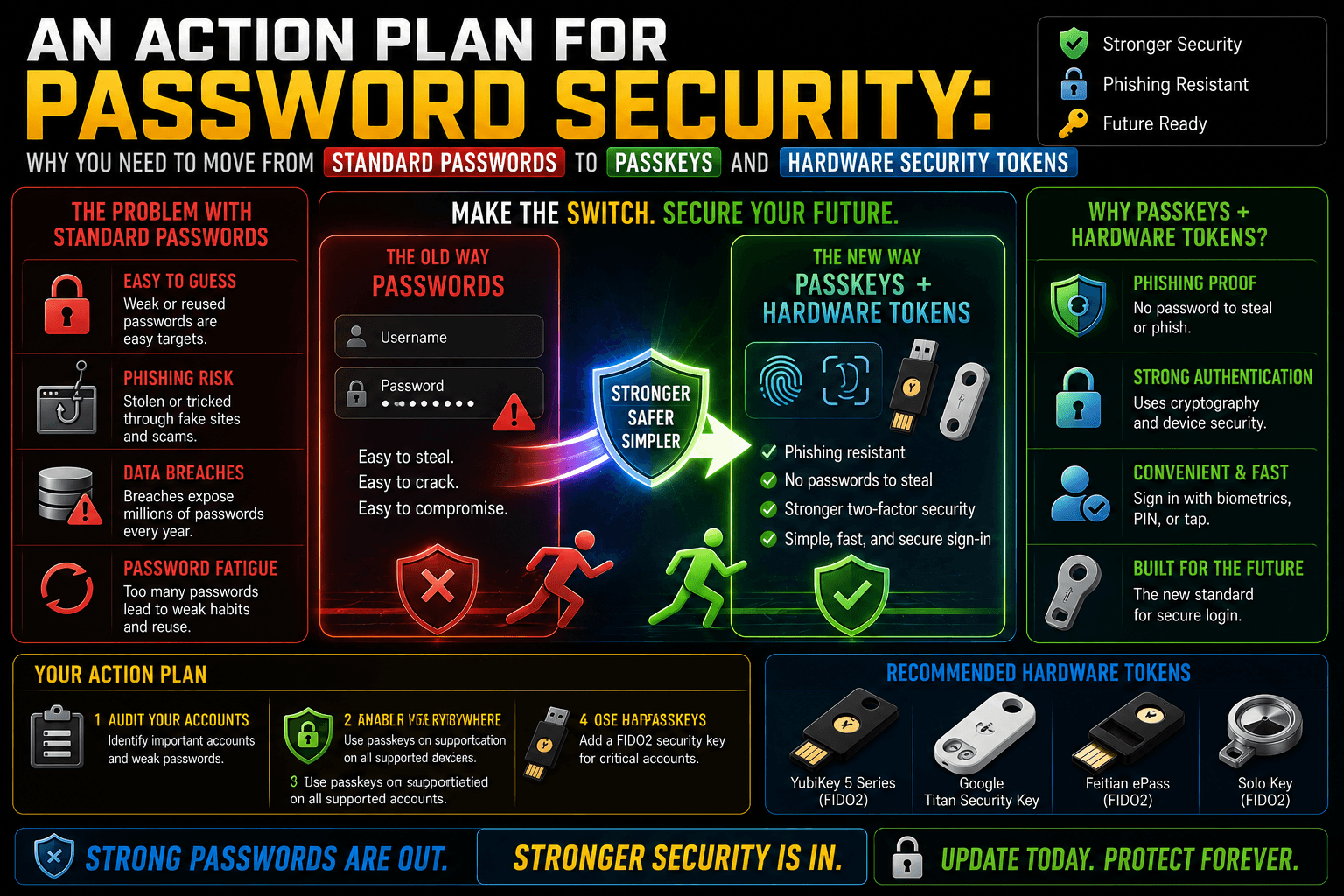
To permanently eliminate this vulnerability, the cybersecurity ecosystem has shifted toward cryptographic, passwordless authentication. This action plan outlines why you must transition from standard text passwords to a combination of Passkeys and Hardware Security Tokens.
1. The Vulnerability Hierarchy: Passwords vs. Passkeys vs. Tokens
To understand why a transition is necessary, consider how each authentication method handles a security handshake.
| Authentication Method | Primary Mechanism | Susceptible to Phishing? | Vulnerable to Server Breaches? | User Effort Level |
|---|---|---|---|---|
| Standard Password | Shared Secret (Text string stored by you and the server). | Yes (High) | Yes (If the server hash leaks). | High (Requires memory or a password manager). |
| Passkey (FIDO2 / WebAuthn) | Cryptographic Key Pair (Asymmetric encryption linked to biometrics). | No | No (Servers only hold public keys). | Low (Single biometric scan). |
| Hardware Token (YubiKey) | Physical Cryptographic Co-processor (Isolated USB/NFC hardware). | No | No | Low (Physical tap/touch). |
The Core Flaw of Passwords: The Shared Secret
A standard password is a “shared secret.” Both you and the website must know it. If an attacker tricks you into typing that secret into a fake login page, your account is compromised. If the website’s database is hacked, your secret is exposed.
The Innovation of Passkeys: Asymmetric Cryptography
Passkeys replace text with a pair of mathematically linked cryptographic keys: a Public Key and a Private Key.
- The website’s server receives and stores only the Public Key (which is useless to an attacker).
- Your phone, laptop, or password manager securely locks away the Private Key inside an isolated hardware environment (like Apple’s Secure Enclave or Android’s Titan M chip).
- When you log in, your device uses the private key to sign a cryptographic challenge sent by the server. Your biometrics (Face ID, Touch ID, or Windows Hello) simply unlock your local private key to allow this signature—your biometric data never leaves your device.
2. Why Passkeys Completely Neutralize Phishing
Passkeys are fundamentally unphishable due to a mechanism called Domain Binding.
When a passkey is created, the underlying WebAuthn protocol permanently binds that cryptographic key to the specific, verified domain name of the website (e.g., login.microsoft.com).
[ Phishing Attack Simulation ]

Fake Phishing Site (e.g., micr0s0ft-login.com)
       │
       ├─► Asks for Password ──► User types it ──► Account Compromised!
       │
       └─► Requests Passkey ───► Browser checks Domain ──► Domains Mismatch ──► Handshake Blocked (Safe)
If you accidentally click a highly convincing phishing link that mimics your bank or work portal, your browser and device look at the domain under the hood. Because the fake domain doesn’t match the origin domain stamped into the passkey, your device refuses to offer the private key. There is no password for you to accidentally type, meaning the phishing attack fails instantly.
3. Hardware Security Tokens: The Ultimate Physical Lock
While passkeys stored on your smartphone or computer are incredibly secure, they are still software-based keys tied to an operating system. For high-value accounts—like your primary email, financial portals, or corporate networks—you should back them up or reinforce them with Hardware Security Tokens (such as a YubiKey or Google Titan Key).
The Air-Gapped Advantage: Hardware tokens are physical USB or NFC devices containing a dedicated cryptographic chip. The private keys are generated directly inside the physical token and can never be extracted or copied by software, malware, or a remote hacker.
To authorize a login, you must physically plug the token into your device or tap it against your phone via NFC, and physically touch a gold contact pad on the key to verify user presence. A hacker sitting halfway across the globe cannot physically touch your key, creating an absolute barrier to unauthorized remote access.
4. Execution Roadmap: Transitioning to Passwordless Security
Moving away from legacy passwords can feel overwhelming, but you can systematically upgrade your security footprint by following this structured deployment order:
Audit and Upgrade Your Password Manager
Secure your data vault
1. Audit and Upgrade Your Password Manager: Secure your data vault.
Ensure your primary password manager (such as Bitwarden, 1Password, or Proton Pass) completely supports native passkey storage. Secure this vault with a strong master password and hardware-based two-factor authentication.
Secure Core Identity Anchors First
Protect your recovery options.
2. Secure Core Identity Anchors First: Protect your recovery options.
Link to your primary email accounts (Google, Microsoft, Apple ID) and your primary password manager. Navigate to security settings, select “Passkeys” or “Security Keys,” and register your device or hardware token. Print out or store the provided emergency recovery codes in a physical safe.
Convert Financial and High-Risk Accounts
Systematic migration
3. Convert Financial and High-Risk Accounts: Systematic migration.
Gradually update your high-priority accounts (banking, cryptocurrency exchanges, and shopping platforms). Create a local passkey on your primary machine or hardware token, and immediately disable standard SMS text-message 2FA, which is vulnerable to SIM-swapping attacks.
Remove Text Passwords Where Possible
Clean up legacy access.
4 . Remove Text Passwords Where Possible: Clean up legacy access.
For platforms that support full passwordless login, completely remove the traditional password option from your account profile. This forces the login portal to exclusively require a cryptographic handshake, closing the door on credential stuffing permanently.
The Redundancy Rule: Hardware tokens and passkeys are incredibly robust, but if you lose your physical key or drop your phone in the ocean, you risk getting locked out. Always register at least two authentication factors. Buy a primary hardware token for your keychain, buy a secondary backup token to store safely at home, and keep your emergency account recovery codes printed out offline.