
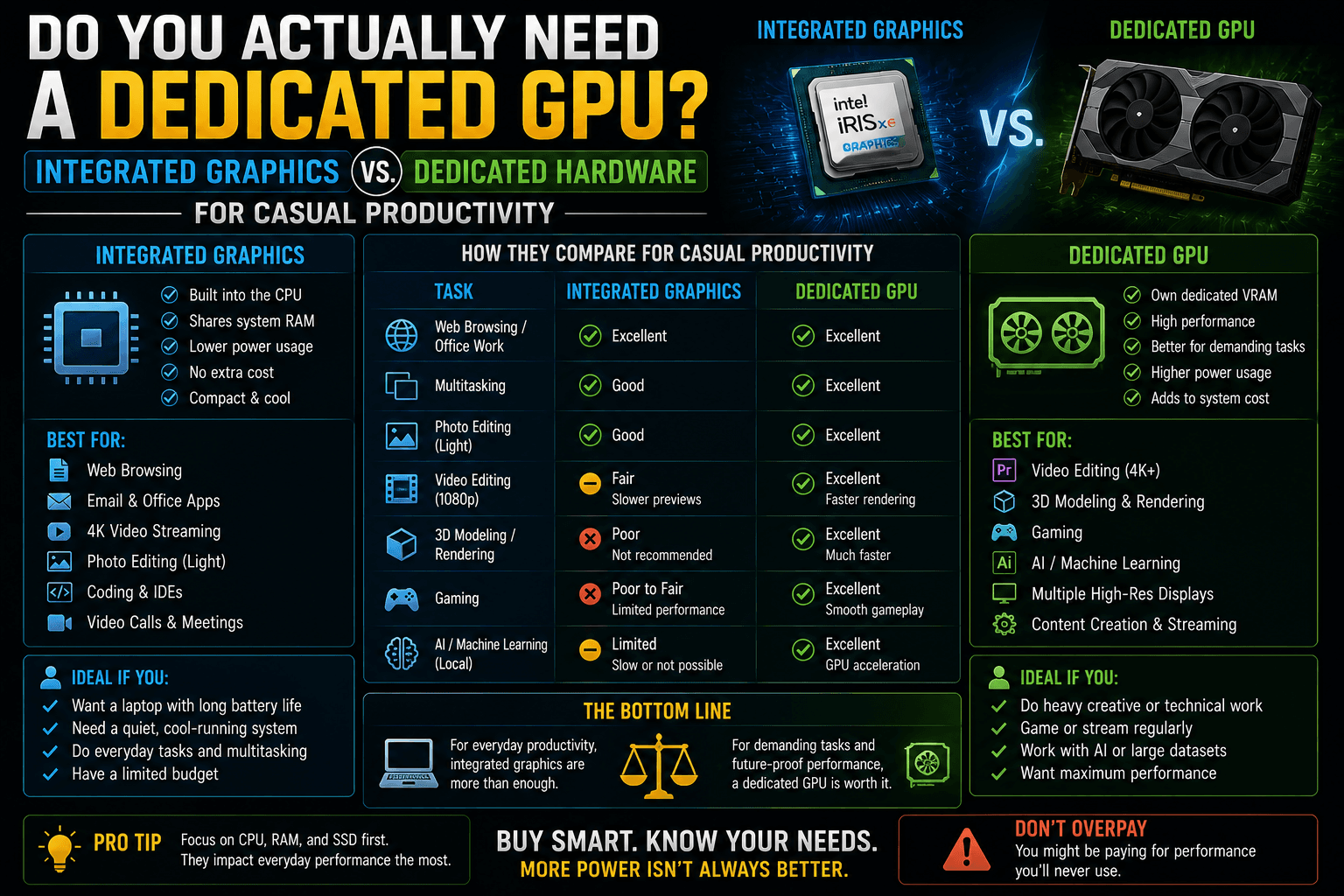
When configuring a new laptop or desktop system, one of the biggest choices that directly impacts the price tag is whether to choose a system with Integrated Graphics or step up to a Dedicated GPU.
For years, the conventional wisdom was simple: if you wanted to do anything beyond basic web browsing, you needed to pay extra for a dedicated graphics card from NVIDIA or AMD. However, chip architecture has fundamentally shifted. Modern processors have turned integrated graphics into performance powerhouses, altering the value equation for casual users.
If your daily routine revolves around casual productivity—spreadsheets, dozens of browser tabs, document drafting, and streaming media—paying for a dedicated GPU might be a complete waste of money. Here is the breakdown of how these architectures operate and how to choose the right one for your workflow.
1. The Architectural Divide: How They Work
The fundamental difference between integrated and dedicated graphics comes down to physical space and how your computer handles memory.
[ Integrated Graphics Architecture ]
┌────────────────────────────────────────┐
│ CPU Die                                │
│  ┌──────────────┐    ┌──────────────┐  │ ──► Shares System RAM
│  │ Processor    │    │ Graphics     │  │     (Slower, shared pool)
│  └──────────────┘    └──────────────┘  │
└────────────────────────────────────────┘

[ Dedicated GPU Architecture ]
┌──────────────────────┐      ┌──────────────────────┐
│ Dedicated GPU Chip   │ ◄──► │ Dedicated VRAM       │ (Isolated, hyper-fast
└──────────────────────┘      └──────────────────────┘  pool of memory)
Integrated Graphics (iGPU)
Integrated graphics means the graphics processing engine is baked directly onto the same physical silicon die as your main processor (CPU).
- The Memory Pool: Because space on the processor chip is limited, an iGPU does not have its own memory. Instead, it steals a portion of your laptop’s main System RAM to use as video memory.
- The Modern Standard: Examples include Intel Iris Xe / Intel Arc Graphics and AMD Radeon Graphics.
Dedicated Graphics (dGPU)
A dedicated GPU is an entirely separate, isolated hardware ecosystem. It sits on its own circuit board, features its own massive cooling fans, and operates using its own hyper-fast, specialised video memory (VRAM).
- The Memory Pool: It does not touch your system RAM. It handles all visual computations within its own hardware loop.
- The Modern Standard: Examples include the NVIDIA GeForce RTX series or AMD Radeon RX discrete cards.
2. Head-to-Head: Casual Productivity Benchmarks
“Casual productivity” typically involves multitasking across office suites, running communication tools like Slack or Microsoft Teams, managing heavy browser layouts, and conducting video calls. Let’s look at how both systems handle these workloads.
| Productivity Task | Integrated Graphics (iGPU) | Dedicated GPU (dGPU) | The Winner |
|---|---|---|---|
| 4K Video Playback & Streaming | Smooth 60 FPS execution via hardware decoding blocks. | Flawless execution, but wastes significant power. | Integrated Graphics (More efficient) |
| Multi-Monitor Display Setup | Easily drives two external 4K monitors simultaneously. | Can drive 3 to 4 high-resolution displays. | Tie (iGPU is plenty for dual screens) |
| Heavy Excel Macro Calculation | Dependent entirely on CPU speed and System RAM size. | No impact (Excel calculations run on the CPU). | Tie (GPU doesn’t matter here) |
| Video Conferencing Background Blur | Handles background isolation easily via modern NPU/iGPU blocks. | Handles smoothly, but fans may spin up. | Integrated Graphics (Quieter and cooler) |
| Entry-Level Photo Editing (Canva/Lightroom) | Smooth cropping, basic color grading, and filtering. | Faster AI-accelerated rendering and export times. | Dedicated GPU (Saves seconds per export) |
3. The Hidden Benefits of Keeping It Integrated
If integrated graphics can handle standard office tasks, choosing a system without a dedicated graphics card unlocks major real-world quality-of-life benefits:
- Massive Battery Longevity: Dedicated GPUs are incredibly power-hungry hardware components. A laptop running purely on integrated graphics will almost always outlast an identical laptop with a dedicated graphics card by 2 to 4 hours of battery life under casual workloads.
- Whisper-Quiet Operation: Because an iGPU produces very little heat, your laptop’s internal cooling system doesn’t have to work hard. You can write documents, attend Zoom meetings, and watch videos in complete silence without your laptop sounding like a jet engine.
- Sleeker, Lighter Form Factors: Getting rid of a dedicated GPU board and its massive copper heat pipes allows manufacturers to build laptops that are remarkably thin and lightweight—making your daily commute or travel significantly easier.
4. The Tipping Point: When Do You Actually Need a Dedicated GPU?
While integrated graphics are perfect for casual productivity, certain tasks cross a performance threshold where dedicated hardware becomes mandatory:
[Image comparing rendering performance of a laptop utilising integrated graphics vs a dedicated hardware GPU]
- True 3D Gaming: If you want to play modern, visually demanding games (like Cyberpunk 2077 or Elden Ring) at high resolution with smooth frame rates, an integrated chip will struggle. You need the raw computing power and specialised VRAM of a dedicated card.
- Professional Video Editing: If your workflow moves past casual video clipping and involves scrubbing through multi-stream 4K or 8K RAW video footage, colour grading in DaVinci Resolve, or working with complex 3D motion graphics in After Effects, a dedicated GPU saves hours of rendering time.
- Local AI and Data Science: Running large local AI models, training machine learning datasets, or operating massive local developer environments requires the specialised CUDA processing cores found on dedicated graphics hardware.
The Verdict: Save Your Money
If you do not play heavy 3D video games, do not render high-resolution video for a living, and do not compile complex 3D environments, you do not need a dedicated GPU. Instead of spending an extra ₹15,000 to ₹30,000 on a dedicated graphics card that will sit idle, drain your battery, and generate heat, take that money and invest it in two components that will actually make your daily productivity faster:
- Upgrade to 16GB or 32GB of System RAM: This gives your computer more breathing room to handle hundreds of browser tabs and background applications simultaneously.
- Buy a Faster NVMe SSD: This ensures your computer boots up instantly, applications launch without delay, and files copy in the blink of an eye.
Frequently Asked Questions
Q 1: If the Lenovo LOQ and HP Victus have the same processor and RTX 4050 graphics card, why does the LOQ perform better in games?
It comes down to TGP (Total Graphics Power) and thermal headroom. Laptop manufacturers are allowed to decide how much electrical wattage they feed to the same graphics chip.
HP implements a conservative 75W TGP on the budget Victus to prevent the laptop from running too hot or loud. Lenovo builds a more robust cooling chamber into the LOQ, allowing it to pump 95W to 125W of power into the same RTX 4050. Because the graphics core has more electrical energy to burn, it runs at higher clock speeds, yielding a direct 10% to 15% increase in frame rates (FPS) in demanding games.
Q 2: Can I use my laptop’s standard system RAM to boost my graphics card’s VRAM if a local AI model or game runs out of space?
No. System RAM (DDR5) and Video RAM (GDDR6) serve fundamentally different, non-interchangeable purposes. VRAM is physically soldered right onto your graphics card and cannot be upgraded. It communicates with your graphics processor over an ultra-wide, high-bandwidth pipeline designed to shift massive visual asset pools instantly.
If a local Large Language Model (LLM) requires 9 GB of space and your laptop graphics card only has 8 GB of VRAM, the inference engine is forced to overflow the remaining 1 GB into your shared System RAM. Because System RAM operates at a vastly slower data-transfer speed than VRAM, your generation speeds will slow down to a crawl (dropping to roughly one word per second).
Q 3: Why do Apple MacBooks have an architectural advantage over Windows laptops when it comes to running large, private AI models?
[Image comparing Apple Silicon Unified Memory Architecture vs Windows split CPU and dedicated GPU VRAM pools]
Apple Silicon (M-series Pro and Max chips) utilises a Unified Memory Architecture (UMA). In a MacBook, the CPU, GPU, and Neural Engine all share one single, high-speed pool of system memory.
If you buy a MacBook Pro with 64GB of unified memory, you can assign up to 45GB+ of that exact pool to act purely as VRAM. On a Windows laptop, you are limited strictly to the dedicated VRAM physically attached to your graphics card (typically capped at 8GB or 12GB on mid-range laptops). This allows a premium Mac to easily load massive 32-Billion parameter AI models completely offline—tasks that would completely crash a top-tier Windows laptop.
Q 4: If integrated graphics (iGPU) can handle a casual productivity workflow, why do budget laptops still try to sell me a dedicated GPU?
Marketing departments use the presence of a dedicated graphics sticker (like NVIDIA GeForce) to justify a higher retail markup.
For standard office productivity—such as managing 50 browser tabs, processing Excel formulas, streaming 4K media, and multitasking over Zoom—a modern integrated chip (like Intel Arc or AMD Radeon) is already flawless. It uses a fraction of the electricity, keeping your laptop whisper-quiet, perfectly cool, and adding 2 to 4 hours of extra battery life.
You only need to cross the threshold into paying for a dedicated GPU if your tasks require heavy, sustained 3D calculation, such as professional 4K video editing, local AI model training, or playing modern AAA video games.