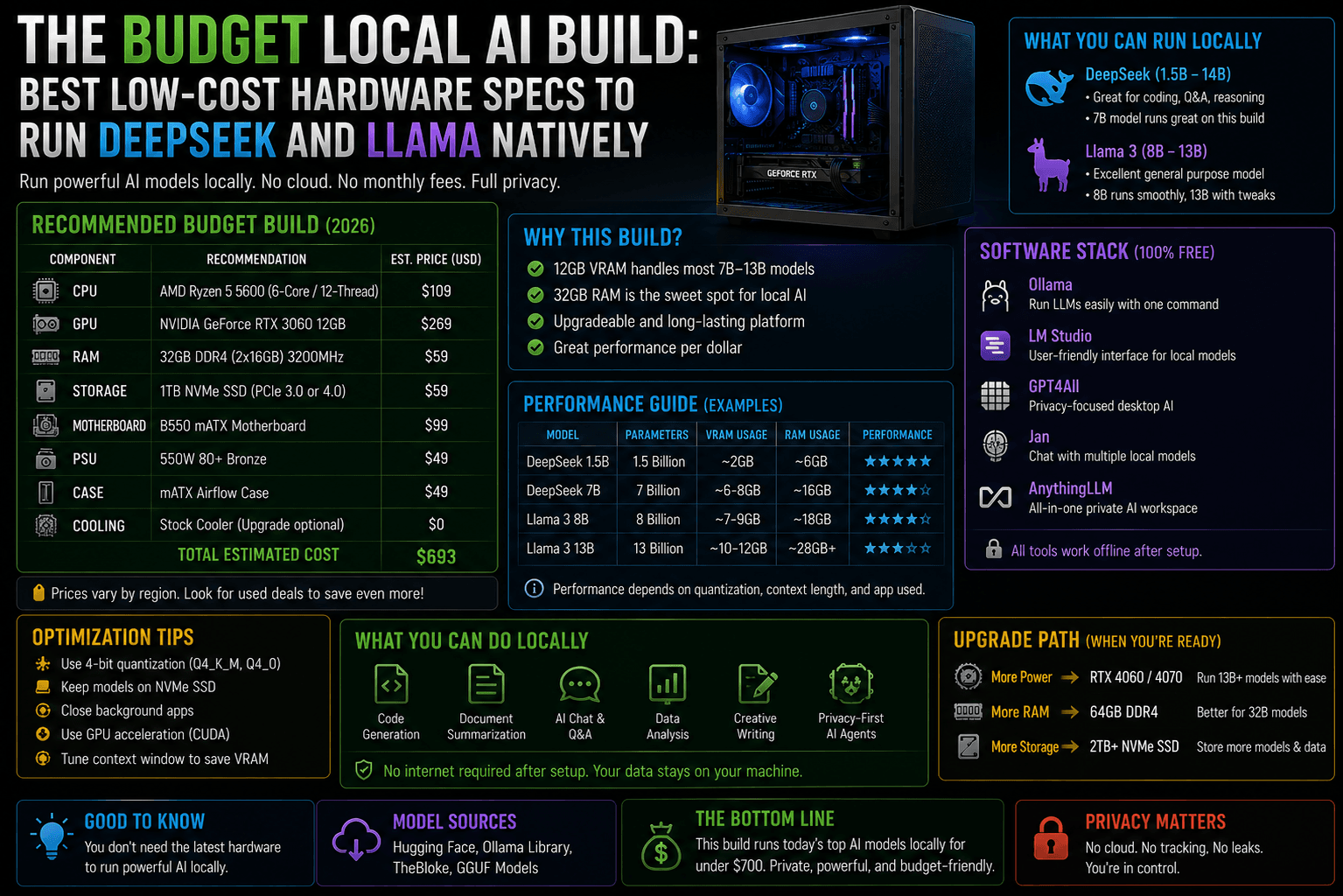
Running cutting-edge Large Language Models (LLMs) like Meta’s Llama 3.1 / 3.3 and the highly sought-after DeepSeek-R1 locally doesn’t require a ₹5,00,000 enterprise server.
Thanks to advanced quantization (compressing models into 4-bit or 8-bit configurations using GGUF file formats), you can run incredibly smart models on highly affordable consumer components.
When building a budget local AI box, standard PC building rules go out the window. You don’t care about a hyper-fast CPU or flashy RGB lighting. Your entire performance budget revolves around two core metrics: VRAM Capacity and Memory Bandwidth.
1. Understanding the Budget AI Rule of Thumb
To run an AI model smoothly (achieving a human-reading speed of 15–30+ tokens per second), the entire model must fit completely inside your graphics card’s video memory (VRAM).
If a model overflows by even a single gigabyte into your standard system RAM, your processing speed will instantly drop to a crawl.
[Image comparing AI token generation speeds when a model fits entirely in fast GPU VRAM vs when it overflows into slow system RAM]
The Reality of Running DeepSeek-R1
- The Full Model (671B Parameters): Requires over 700GB of VRAM. It is entirely impossible to run on a budget.
- The Smart Budget Solution: DeepSeek released Distilled Models (trained using DeepSeek’s reasoning logic but built on smaller 8-Billion and 14-Billion parameter architectures from Meta and Qwen). A budget PC can run these distilled variants flawlessly.
2. The Spec Matrix: Three Budget Tiers
Here is how to allocate your budget based on your target model tier.
| Build Tier | Target Models | Optimal Hardware Core | Estimated Build Cost |
|---|---|---|---|
| Tier 1: The ultra-Budget Entry | Llama 3.1 (8B) DeepSeek-R1 (Distill-8B) | NVIDIA RTX 4060 Ti (16GB) | ~₹65,000 – ₹75,000 |
| Tier 2: The “Sweet Spot” King | Llama 3.3 (70B Q3) DeepSeek-R1 (Distill-14B) | Used NVIDIA RTX 3090 (24GB) | ~₹90,000 – ₹1,10,000 |
| Tier 3: The Dual-GPU Powerhouse | Full Llama 3.3 (70B Q4) DeepSeek-R1 (Distill-32B) | Dual Used RTX 3090s (48GB Total) | ~₹1,60,000 – ₹1,80,000 |
3. Component-by-Component Blueprint
The GPU (Where 80% of Your Thought Belongs)
Never buy an 8GB graphics card for an AI build.
- On a Strict Budget: The NVIDIA RTX 4060 Ti (16GB version) is the cheapest entry point for a brand-new card. Its 16GB buffer easily holds a 4-bit or 8-bit quantized version of Llama 3.1 8B or DeepSeek-R1 8B with plenty of room left over for massive multi-page prompt context windows.
- The Absolute King of Budget AI: A used NVIDIA RTX 3090 (24GB). Because it features a massive 24GB VRAM buffer running on an ultra-wide 384-bit memory bus, it delivers blazing-fast processing speeds that outperform newer, more expensive mid-range cards.
System RAM & CPU (The Support Cast)
- System RAM: Buy a minimum of 32GB of DDR5 RAM. If you ever want to run massive models using your CPU (slowly but reliably), look into upgrading to 64GB. Always buy dual-channel kits (e.g., two 16GB sticks instead of one 32GB stick) to maximize memory bandwidth.
- The CPU: Keep it simple. An AMD Ryzen 5 5600X or an Intel Core i5-12400F is more than enough. The CPU’s only job in an execution loop is to hand data over to your graphics card.
The Motherboard & Power Supply (The Architecture Base)
- Motherboard: If you plan to start with one graphics card but want to add a second one later, look for a motherboard that features two physical PCIe x16 slots spaced widely apart to accommodate dual-slot graphics cards.
- Power Supply (PSU): Do not cheap out here. A single RTX 3090 can experience sudden power spikes. Buy a minimum 850W Gold-certified PSU from a tier-one brand (like Corsair, Seasonic, or MSI). If you plan to run dual GPUs down the line, buy a 1200W+ PSU immediately to save yourself from a costly replacement later.
4. The Execution Software Pipeline
Once your low-cost hardware is assembled, you do not need complex programming environments to interact with your models. You can launch your local environment using this highly optimized, consumer-friendly software stack:
Install Ollama
The Local Engine
1. Install Ollama: The Local Engine.
Download and install Ollama (available for Windows, Linux, and macOS). Ollama acts as a quiet background engine that automatically detects your NVIDIA CUDA graphics cores and manages model loading.
Pull Your Target Models
Command Line Fetch
2. Pull Your Target Models: Command Line Fetch.
Open your terminal or command prompt and pull your chosen models directly from the repository using lightweight commands:
ollama run llama3.1(Fetches the 8B model)ollama run deepseek-r1:8b(Fetches the Llama-distilled reasoning model)
Deploy Open WebUI via Docker
The Visual Interface
3 . Deploy Open WebUI via Docker: The Visual Interface.
To move away from the command line, run a local Open WebUI container inside Docker. This sets up a gorgeous, responsive, completely private chat interface in your browser that looks and operates exactly like ChatGPT or Claude.
The Budget Optimization Verdict: If you have ₹70,000, buy a brand new PC built around the RTX 4060 Ti 16GB. If you have ₹1,00,000, actively hunt for a clean, used RTX 3090 24GB from a reputable seller. That extra 8GB of VRAM completely shifts your capability ceiling, letting you move past basic chatbots and dive straight into advanced reasoning models.