
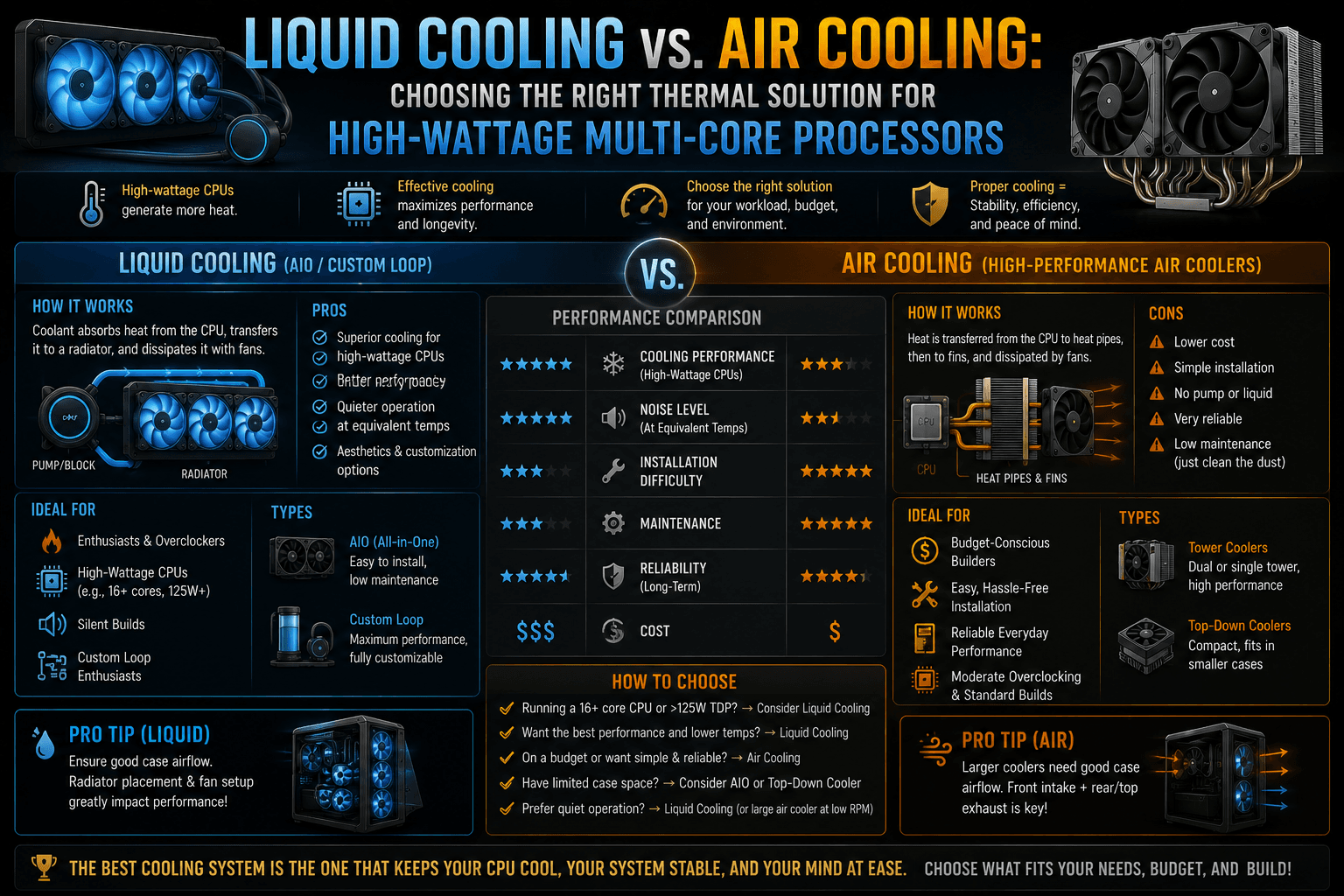
Modern high-tier processors—like Intel’s Core i9 or AMD’s Ryzen 9 architectures—pack an incredible number of execution cores into a tiny sliver of silicon. When these chips handle sustained, heavy multi-threaded workloads like 3D rendering, video compiling, or local AI inference, their power consumption can easily surge north of 250 to 300 Watts.
This extreme power density creates a massive thermal challenge. If your cooling system cannot draw heat away from the processor die fast enough, the chip will immediately trigger thermal throttling—artificially slashing its clock speeds to protect itself from physical damage, crippling your performance.
To keep these high-wattage monsters running at maximum capacity, you must choose between two fundamentally different thermal philosophies: Air Cooling or Liquid Cooling (AIO).
1. The Architectural Mechanics: How They Dissipate Heat
While both systems exist to solve the exact same problem, their mechanical approaches to moving heat away from your hardware differ completely.
[ Air Cooling Loop ]
CPU Die ──► Copper Baseplate ──► Heat Pipes (Vaporization) ──► Aluminum Fins ──► Fan Exhaust

[ Liquid Cooling Loop ]
CPU Die ──► Copper Block ──► Liquid Coolant ──► Pump ──► Tubes ──► Radiator Fins ──► Fan Exhaust
High-End Air Coolers
Air cooling relies on structural mass, thermodynamics, and direct airflow.
- The Process: A solid copper baseplate sits directly on the CPU. Soldered to this baseplate are sealed copper heat pipes containing a tiny amount of liquid vacuum-sealed inside. As the CPU heats up, this liquid vaporizes, flashes to the top of the pipes, condenses inside a massive stack of aluminum cooling fins, and cycles back down. Large fans blow directly through these fins to push the heat out of your PC case.
- The Paradigm: Examples include twin-tower giants like the Noctua NH-D15 or Thermalright Peerless Assassin.
All-In-One (AIO) Liquid Coolers
Liquid cooling uses the superior thermal conductivity of water to move heat completely away from the motherboard area.
- The Process: A water block containing a micro-finned copper plate is mounted to the CPU. An integrated mechanical pump continuously circulates a specialized liquid coolant through rubber tubes up to a large aluminum or copper radiator. The heated liquid passes through the radiator’s dense channels, where high-static-pressure fans cool it down before the pump loops it back to the CPU.
- The Paradigm: Examples include 280mm, 360mm, or massive 420mm radiators like the Arctic Liquid Freezer series.
2. Head-to-Head: Thermal Performance Matrix
When managing processors that sustain high wattages over long periods, the physical size of your cooler establishes your performance ceiling.
| Thermal Solution | Maximum Thermal Capacity | Time to Saturation | Peak Performance Behavior | Expected Lifespan |
|---|---|---|---|---|
| Dual-Tower Air Cooler | Up to ~250W | Fast (1–2 minutes) | Temperatures spike quickly under load, then stabilize as fans hit 100%. | Near Infinite (Only the fans can fail; easily replaced for ₹800). |
| 240mm AIO Liquid Cooler | Up to ~260W | Medium (5–7 minutes) | Performs identically to a high-end air cooler, but takes longer to heat up. | 3–6 Years (Pump degradation or permeation). |
| 360mm / 420mm AIO Liquid | 300W+ | Slow (10–15 minutes) | Maintains noticeably lower peak temperatures under extended multi-hour workloads. | 3–6 Years (Pump degradation or permeation). |
3. The Thermal Soak Advantage of Liquid Cooling
The biggest performance differentiator for high-wattage multi-core processors is a thermodynamic concept called thermal capacity. Water can absorb significantly more heat energy per degree of temperature rise than aluminum or copper can.
[Image comparing the thermal absorption capacity and heat dissipation paths of a massive air cooling heatsink vs a 360mm liquid cooling radiator setup]
When an air cooler faces a sudden multi-core rendering workload, its aluminum fin towers saturate with heat almost instantly. The fans must immediately ramp up to 100% speed to keep up, creating a sudden acoustic spike.
A large 360mm or 420mm liquid cooling radiator holds a substantial volume of liquid. When the CPU spikes to 100% utilization, the liquid acts as a massive thermal sponge, absorbing the heat slowly. It can take 10 to 15 minutes of continuous rendering before the fluid inside the loop fully warms up. For short, bursty workloads (like opening apps, compiling quick scripts, or loading game levels), a large liquid cooler keeps the processor running significantly cooler and quieter because the system rarely hits full thermal saturation.
4. The Hidden Trade-offs: Reliability vs. Clearance
Choosing between these two options requires weighing raw thermal performance against long-term reliability and physical space limits.
Case and Component Clearance
- Air Cooling Pitfalls: Massive dual-tower air coolers are physically gigantic. They frequently block access to your motherboard’s RAM slots, forcing you to buy low-profile memory sticks. They also require extremely wide PC cases; otherwise, the top of the cooler will smash against your side glass panel.
- Liquid Cooling Pitfalls: AIO coolers clean up the center of your motherboard completely, eliminating RAM clearance issues. However, you must ensure your PC case physically has the mounting rails to hold a long 360mm or a thick 420mm radiator at the top or front intake.
Risk Profiles and Failure Modes
- Air Coolers (Zero Risk): An air cooler is a passive block of metal. The only moving parts are standard cooling fans. If a fan dies after 5 years, the metal heatsink will still prevent your CPU from melting while you wait for a cheap replacement fan to arrive.
- Liquid Coolers (Defined Lifespan): AIO liquid coolers are highly complex mechanisms. Over time, the mechanical pump will eventually wear out and die. Furthermore, microscopic amounts of liquid slowly evaporate through the rubber tubes over the years (a process called permeation), leading to air bubbles that cause gurgling noises and degraded performance. If an AIO pump fails, the system loses all cooling capability immediately, causing the PC to shut down within seconds of hitting a load.
5. The Decision Blueprint: What Should You Buy?
To make the final choice for your multi-core build, map your decision directly to your processor’s rated power draw and your primary use case:
Evaluate Your Processor’s True Wattage
Under 200W Peak Load
1. Evaluate Your Processor’s True Wattage: Under 200W Peak Load.
Look up the independent power benchmarks for your specific CPU. If you are running a mid-range multi-core chip (like an AMD Ryzen 7 9700X or Intel Core i5-14600K) that hovers around 125W to 180W under full load, stick with a High-End Air Cooler. Liquid cooling is a luxury asset here, not a performance necessity.
Identify Your Primary Workload Duration
Over 250W Continuous Load
2. Identify Your Primary Workload Duration: Over 250W Continuous Load.
If you are running an absolute flagship chip (like the Intel Core i9-14900K or AMD Ryzen 9 9950X) and your daily work involves hours of continuous 3D rendering, video encoding, or local LLM execution, buy a 360mm or 420mm AIO Liquid Cooler. High-end air coolers cannot handle 250W+ continuously without allowing the chip to hit its thermal throttling limit (100∘C).
Check Your Case Geometry Constraints
Form factor and space restrictions
3 . Check Your Case Geometry Constraints: Form factor and space restrictions.
Measure your chassis. If your PC case cannot support a top-mounted 360mm radiator, do not force a front-mounted intake installation if it crowds your graphics card space. If space is tight but you have a high-wattage chip, opt for the largest dual-tower air cooler your case width allows, and consider slightly undervolting your CPU in the BIOS to drop power draw by 10% without losing performance.
The Builder’s Verdict: If your goal is ultimate peace of mind, zero maintenance, and a system that will run reliably for a decade without a single thought, buy a premium Air Cooler. If your goal is extracting every single drop of multi-threaded performance from a flagship processor, maintaining a clean aesthetic, and keeping fan noise low during heavy workloads, accept the 4-to-5-year lifespan trade-off and deploy a 360mm+ Liquid Cooler.