
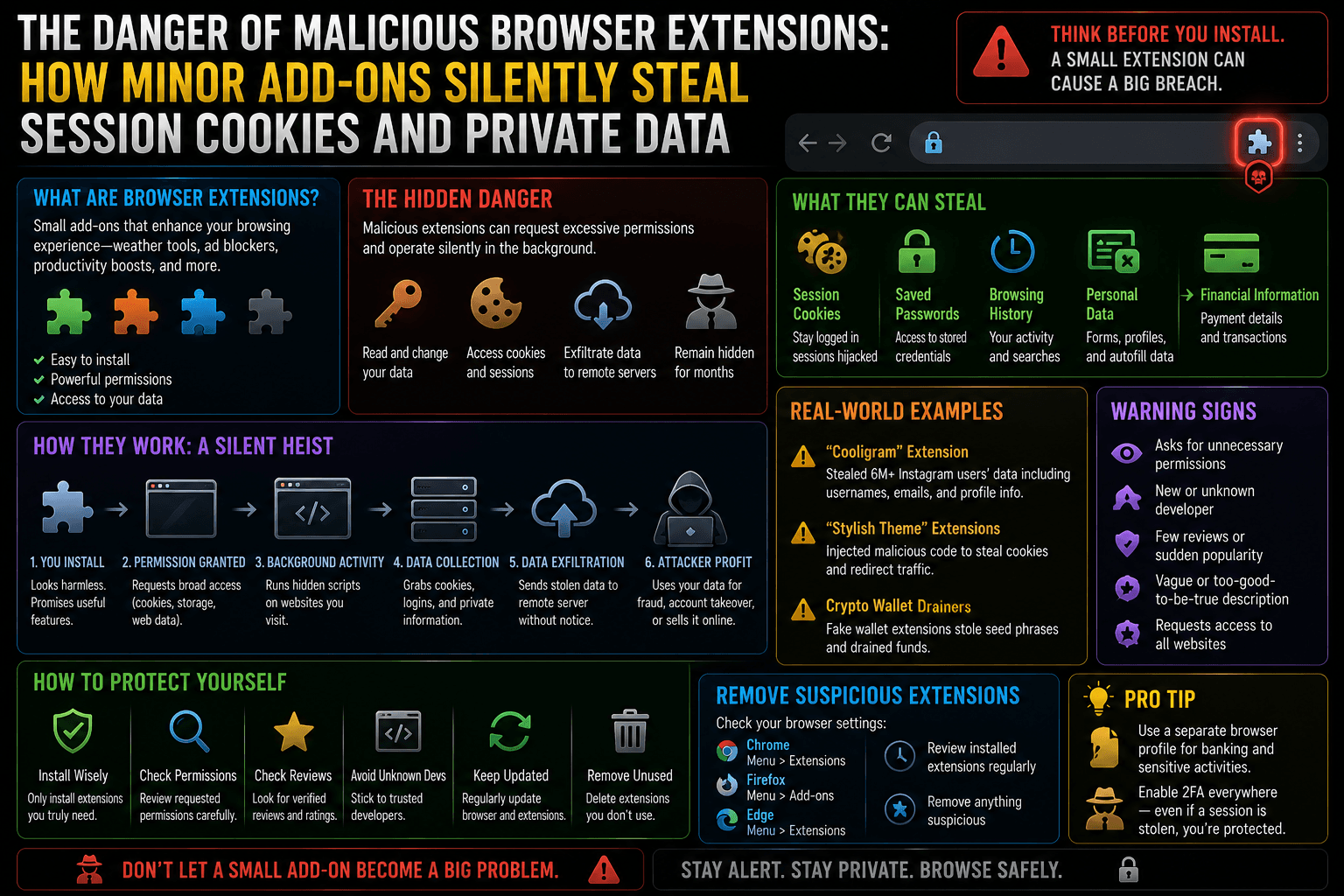
We treat browser extensions as harmless, lightweight utilities—a quick ad blocker, a grammar checker, a dark mode toggle, or a coupon finder. Because they are tiny files downloaded with a single click from official web stores, we grant them access to our browsers without a second thought.
However, browser extensions represent one of the most potent, silent threat vectors in modern cybersecurity. Unlike traditional malware that your operating system’s antivirus software can easily flag and block, a malicious browser extension operates completely inside your browser’s trusted perimeter.
Once installed, these minor add-ons can quietly read every keystroke, capture login credentials, and siphon off your session cookies, allowing hackers to completely hijack your online accounts without ever knowing your passwords.
1. The Core Vulnerability: “Read and Change All Your Data.”
When you install a browser extension, a permissions prompt frequently appears stating that the extension requires the ability to “Read and change all your data on all websites.” Most users click “Allow,” assuming this is just a generic technical requirement. In reality, this permission grants the extension access to the browser’s internal Document Object Model (DOM) and network API pipelines.
[Image diagram showing a malicious browser extension intercepting the DOM and session storage layers between the user and trusted websites]
- The Power of DOM Access: If an extension can read and modify the DOM, it means it can visually inspect every webpage you open. It can see the text you type into an online banking form, inject invisible fields to harvest data, or read secret keys displayed on your screen.
- The Network Intercept: Extensions can view, modify, or block network requests. When your browser communicates with a secure server, the extension sits inside the browser before the data is encrypted for transit. It sees your data in plain, unencrypted text.
2. The Mechanics of Cookie Siphoning and Session Hijacking
The primary target for a modern malicious extension is not necessarily your password—it is your Session Cookie.
When you log into an account (like your email or corporate portal) and click “Remember Me,” the website’s server drops a unique cryptographic string called a session token into your browser’s local storage. As long as that cookie remains active, you don’t have to re-enter your password or verify a two-factor authentication (2FA) prompt every time you click a link.
A malicious extension can execute a highly quiet and effective Session Hijacking attack using this exact mechanism:
Query the Browser Cookie Jar
The silent background hook
1. Query the Browser Cookie Jar: The silent background hook.
The extension runs a simple background script using the browser’s native chrome.cookies or browser.cookies API, requesting access to the storage vault where active session tokens are stored.
Extract the Target Session Tokens
Bypassing security flags
2.Extract the Target Session Tokens: By-passing security flags.
Even if a website uses security flags like HttpOnly (which blocks standard website JavaScript from reading the cookie), browser extensions hold elevated administrative privileges that bypass this restriction entirely, scraping the raw token string.
Exfiltrate the Session Packet to a C2 Server
The external data exfiltration
3. Exfiltrate the Session Packet to a C2 Server: The external data exfiltration.
The extension bundles the stolen session cookies into a lightweight, encrypted background network request and beams it to the attacker’s remote Command and Control (C2) server.
Inject the Token and Bypass 2 .FA
Instant account takeover
4.Inject the Token and Bypass 2FA: Instant account takeover.
The attacker buys or receives your session token, injects it directly into their own browser’s storage, and refreshes the page. The website’s server looks at the token, assumes it is you returning to the site, and grants the attacker full access to your account—completely bypassing your password and 2FA defenses.
3. The Bait-and-Switch: How Safe Extensions Turn Evil
A common misconception is that malicious extensions are written by hackers and launched as traps from day one. While that happens, the more dangerous threat vector is the Bait-and-Switch Acquisition.
- The Innocent Phase: An independent developer builds a genuine, highly useful open-source extension (e.g., a simple custom mouse cursor or volume booster). The extension amasses 500,000 trusted users and receives excellent reviews on the Chrome Web Store.
- The Acquisition Offer: A shell company approaches the developer, offering ₹5,00,000 to ₹15,00,000 to purchase the extension entirely. The exhausted developer sells the rights.
- The Silent Malicious Update: The new owners inject a small, obfuscated malicious script into the extension’s codebase. They push an automated update to the web store.
- The Instant Infection: Because browsers update extensions silently in the background without prompting the user, all 500,000 trusted users are instantly infected overnight with malware running inside their browser perimeter.
4. Action Plan: How to Audit and Secure Your Browser Perimeter
To defend your session tokens and digital identity from extension-based exploits, implement this rigid security routine:
- Minimize Your Extension Footprint: Treat extensions like apps on your phone. If you have not explicitly used an add-on in the last 30 days, uninstall it completely. The fewer extensions you run, the smaller your attack surface.
- Implement “On Click” Permission Constraints: Do not give extensions blanket permission to read everything at all times. In your browser’s extension settings, modify site access from “On all sites” to “On click” or “On specific sites.” This forces the extension to remain completely dormant until you explicitly click its icon to wake it up.
[Image showing browser extension settings menu adjusting site access permissions from ‘On all sites’ to ‘On click’]
- Audit Web Store Developer Badges: Before downloading any tool, verify if the creator holds a “Verified Publisher” badge. Read recent reviews, specifically sorting by “Most Recent.” If an extension was recently bought out or updated with malicious code, the review section will quickly fill up with user warnings about sudden adware pop-ups or suspicious background redirects.
- Isolate High-Value Tasks in Clear Profiles: Create separate browser profiles or use a dedicated, extension-free secondary browser (like a clean installation of Brave or Safari) exclusively for handling sensitive operations like online banking, crypto wallets, and enterprise work portals. Keep your casual browser extensions completely isolated from your critical financial assets.
The Digital Safety Rule: Traditional antivirus software scans your hard drive, but it rarely monitors what happens inside your browser’s memory space. If an extension is offering you a premium capability completely free of charge, look closely at the permissions it demands. You may be trading the keys to your entire authenticated digital life for a minor aesthetic convenience.