
For nearly a decade, laptop buyers followed a standard rule of thumb: 8GB of RAM was fine for casual browsing, 16GB was the sweet spot for multitasking and gaming, and 32GB was an expensive, specialized luxury reserved for 4K video editors and virtual machine developers.
In 2026, that math has completely broken.
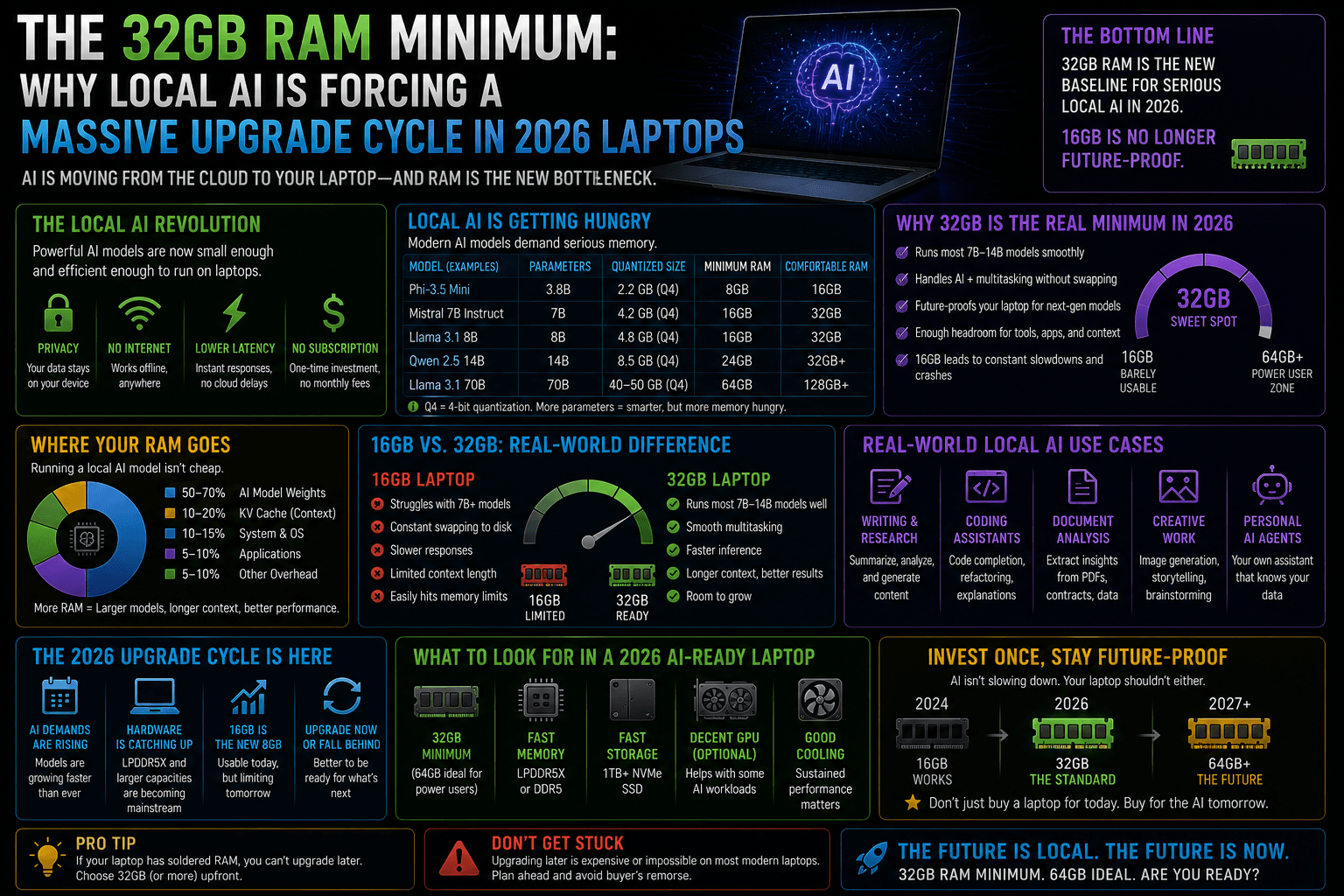
The meteoric rise of “AI PCs”—specifically laptops powered by Qualcomm Snapdragon X Elite, Intel Lunar Lake (Core Ultra Series 2), and AMD Strix Point (Ryzen AI 300) chips—has triggered a massive, forced memory upgrade cycle. While Microsoft technically sets the hardware baseline for on-device Copilot+ features at 16GB, tech buyers and enterprise IT departments are quickly discovering that 32GB of RAM is becoming the true operational minimum to survive the local AI era.
Here is why local inference is eating system memory, and why your next laptop will likely need a 32GB badge.
1. The Unified Memory Trap: CPU, GPU, and NPU Are Sharing One Pool
In traditional desktop computers, the graphics card (GPU) has its own dedicated pool of ultra-fast memory called VRAM. If you run an AI model on a desktop, it sits entirely in the GPU’s isolated sandbox, leaving your system RAM completely untouched.
Laptops do not work this way. Modern thin-and-light laptop architectures use Unified Memory Architecture (UMA). The CPU, the integrated graphics, and the new Neural Processing Unit (NPU) all pull from the same pool of system LPDDR5X RAM.
+-----------------------------------------------------------+
|               System LPDDR5X Memory Pool                  |
|                                                           |
|  [  Windows 11 OS  ] -> Eats ~4GB to 6GB                  |
|  [ 40+ Chrome Tabs ] -> Eats ~4GB to 6GB                  |
|  [ Resident Model  ] -> Eats ~6GB to 12GB (DeepSeek/Phind)|
|                                                           |
|       Total Active Footprint: 14GB - 24GB                 |
+-----------------------------------------------------------+
       ▲                    ▲                    ▲
       │                    │                    │
  +--------+           +--------+           +--------+
  |  CPU   |           |  iGPU  |           |  NPU   |
  +--------+           +--------+           +--------+
When you ask your laptop’s NPU to run an AI feature locally—whether it’s generating an image via Paint Cocreator, translating live audio, or managing local semantic search indexing via Windows Recall—that data must be permanently parked in system memory. If you load a small, highly efficient 8-billion-parameter model quantized to 4 bits, that model alone will permanently consume roughly 5GB to 6GB of your RAM just sitting idle.
2. The 16GB Bottleneck: The Math Doesn’t Add Up
To understand why 16GB is facing an early retirement, look at how a typical user’s memory budget disappears under a normal 2026 daily workload:
| Allocation Target | Memory Footprint (16GB Machine) | Memory Footprint (32GB Machine) |
| Windows 11 OS & Background Background Services | ~4.5 GB | ~5.0 GB |
| Standard Enterprise Apps (Slack, Teams, 30+ Browser Tabs) | ~6.5 GB | ~8.0 GB |
| System AI Background Tasks (Recall indexer, real-time Live Captions) | ~4.0 GB | ~5.5 GB |
| Remaining Free Memory for User Local LLMs (Ollama, Llama 3.1 8B) | ~1.0 GB (System Pagefile Crash) | ~13.5 GB (Flawless Execution) |
On a 16GB laptop, the moment you attempt to activate a localized reasoning tool (like a distilled DeepSeek-R1 or an offline programming assistant), the system runs completely out of breathing room.
Windows handles this by using paging/swap space—shuffling data back and forth between your RAM and your solid-state drive (SSD). This drops your AI generation speeds from a snappy 30 tokens-per-second down to a frustrating, unreadable crawl, while simultaneously wearing down your SSD’s operational lifespan.
3. The Death of the Upgrade Slot (Soldered LPDDR5X)
To maximize battery life and handle the immense data throughput required by modern NPUs (operating at 40 to 50+ TOPS), laptop manufacturers have almost entirely abandoned modular SO-DIMM RAM slots. Instead, chips like Intel’s Lunar Lake pack the RAM directly onto the processor package, or solder premium LPDDR5X modules directly onto the motherboard within millimeters of the processor.
The “Buy It For Life” Dilemma: Because the memory is permanently soldered at the factory, you cannot upgrade your RAM later. A laptop purchased with 16GB of RAM is locked into 16GB forever.
As software developers build increasingly memory-dense AI agents directly into web browsers, text editors, and creative suites, 16GB laptops face a steep depreciation curve. Purchasing a 32GB machine is no longer about future-proofing for five years down the line; it is about ensuring basic app performance next year.
4. The Silicon Shift: How 32GB Changes Your Workflow
Stepping up to a 32GB baseline completely transforms an AI laptop from a proof-of-concept gimmick into a genuine productivity engine.
1. Unrestricted Background Processing: Zero Swap Friction.
With 32GB available, Windows can dedicate a persistent 8GB block to background NPU indexing and local privacy-first search vectors without ever throttling active browser windows or system background processes.
2. True Local LLM Execution: Offline Workflows.
You can comfortably run a highly capable local assistant, like the DeepSeek-R1-Distill-Qwen-14B model, completely offline. This allows you to analyze sensitive corporate documents, draft private emails, and audit code safely on an airplane with zero data leaving your device.
3. Smooth Context Scaling: Unified Allocation.
As your chat conversation grows longer, the model requires more memory to remember what you said thousands of words ago (the “context window”). 32GB provides the overhead required to scale your context windows up to 32k tokens without inducing system lag.
The 2026 Buyer’s Verdict: If you are buying a new laptop, skip the screen upgrades or minor CPU tier bumps if it means settling for 16GB of RAM. Reallocate that budget directly toward 32GB. In the era of local, on-device artificial intelligence, memory capacity is the definitive metric that separates a fast, reliable productivity machine from an absolute bottleneck.